
Context: A new agent has recently been added to the DisplaySweet Content Management System (CMS) portal. They have received an email invitation containing a link to sign in, but upon clicking it, the sign-in page is not displayed.
Root Cause: The most common reason for this issue is that the invitation link has expired. For security purposes, DisplaySweet CMS portal invitation links are only valid for 7 days from the date the agent was initially added to the CMS. If the agent attempts to use the link beyond this 7-day window, it will no longer be active, preventing them from accessing the sign-in page.
Resolution Steps:
- Client Admin Action: A user with client administrator privileges within the DisplaySweet CMS portal will need to take action.
- Locate Agent: Log in to the DisplaySweet CMS portal as a client administrator and navigate to the section where agent accounts are managed. Locate the specific agent who is experiencing the sign-in issue.
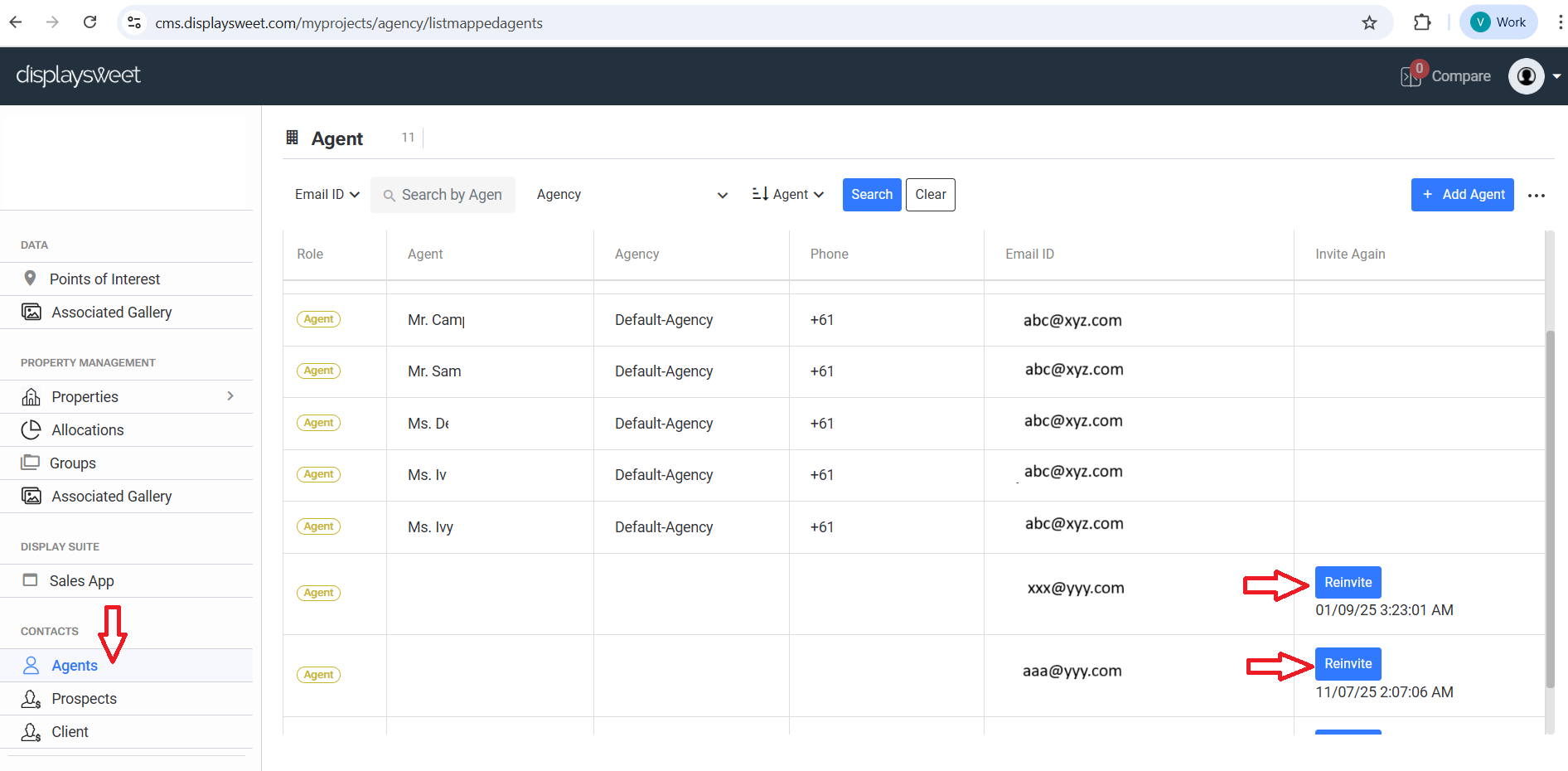
- Initiate Re-invitation: Within the agent's profile or details, there will be an option labelled "Reinvite." Click this button.
- New Invitation Sent: Clicking "Reinvite" will trigger the system to send a brand-new invitation email to the agent's registered email address. This new invitation will contain a fresh, valid link.
- Agent Action:
- Advise the Agent: Inform the agent that a new invitation has been sent.
- Prompt Profile Completion: Instruct the agent to open the new invitation email and click on the updated link. They should then be able to see the sign-in page.
- Complete Profile: Guide the agent to complete their profile setup as prompted. This typically involves setting a password and confirming their details.
- Sign In to DisplaySweet App: Once their profile is complete, the agent can then proceed to sign in to the DisplaySweet application, gaining full access to its features and content.
Important Note: It is crucial to advise the agent to use the new invitation link promptly to avoid a repeat of the expiration issue. If the problem persists after following these steps, please contact DisplaySweet support for further assistance, providing details of the agent's name and the date of the re-invitation.