
If your iPad isn't connecting to Wi-Fi, try these steps:
- Quick Checks:
- Airplane Mode: Ensure it's off. Swipe down from the top right of the screen; the airplane icon should be gray.
- Wi-Fi Settings:
- Go to Settings > Wi-Fi.
- Make sure Wi-Fi is toggled on (the switch will be green).
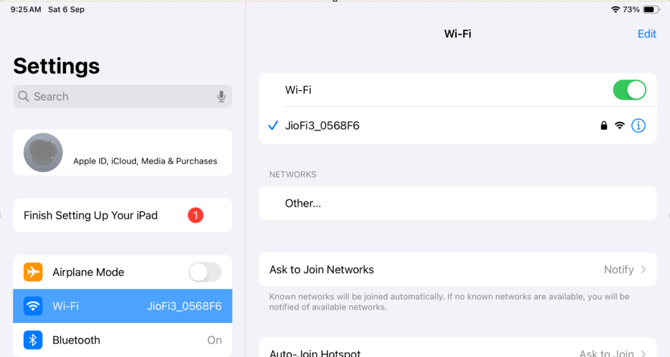
- Tap the name of your desired Wi-Fi network. A blue checkmark indicates a connection. Verify you're connecting to the correct network (not a guest network or one with a weak signal).
- If "Auto-Join" is disabled under your network name, tap it to enable.
- Toggle Wi-Fi: Turn Wi-Fi off, wait 10 seconds, then turn it back on.
- Check for Network Issues: If the iPad detects an issue with your Wi-Fi connection, you'll see a message (like “No Internet Connection") under the name of the Wi-Fi network that you're connected to.
- Restart iPad:
- Press and hold the Top button and one of the Volume buttons until the power off slider appears.
- Drag the slider to power off.
- Wait a few seconds, then press and hold the Top button to turn it back on.
- Restart Router/Hotspot:
- Confirm the router is connected to the modem and cables are secure.
- Turn off both the modem and router.
- Wait 30 seconds, then press the Power button to restart them.
- Forget & Reconnect Network:
- Go to Settings > Wi-Fi, tap the "i" icon next to your network, then tap Forget This Network. Reconnect to the network and re-enter the password.
- Confirm with your IT team that the Wi-Fi password hasn't changed.
- Move Closer to Router:
- Being too far from your router can weaken the signal. Ensure your router is on and try moving closer to improve the connection.
- Restart iPad:
- Update Software:
- An update may resolve connectivity issues. Go to Settings > General > Software Update > Install Now to download available updates.
- Try Another Device:
- If you're connected to Wi-Fi but still can't access the internet, try connecting another device to the same network.
- If the other device also can't get online, you might be experiencing a service outage. Contact your internet provider for assistance.